























Key Takeaways
1. Computer system vulnerabilities are weaknesses in hardware, software, or configurations that attackers can exploit to gain unauthorized access or disrupt services.
2. Regular software updates, strong authentication protocols, and effective data backup strategies can significantly reduce the risk of breaches and protect sensitive information.
3. IS Partners performs cybersecurity assessments and penetration testing to help you identify vulnerabilities and resolve them fast.
Best Practices to Identify Security Vulnerabilities
When it comes to finding security vulnerabilities in your network, there are a few approaches you can take. The first thing to do is check if all your systems and software are up to date. If you’re not using the latest versions of your software, you could be missing out on important patches and updates that boost your security.
Now here are some more of the best practices you can implement to identify security vulnerabilities:
- Regularly check for software updates.
- Schedule routine security audits.
- Invest in vulnerability scanning tools.
- Watch for unusual network activity.
- Educate staff on security practices.
- Limit access to sensitive information.
What are Computer System Vulnerabilities?
Computer system vulnerabilities are weaknesses or flaws in hardware, software, or configurations that can be exploited by attackers to gain unauthorized access, disrupt services, or compromise data integrity.
These network vulnerabilities can arise from various sources, including software bugs, configuration errors, human errors or just outdated software.
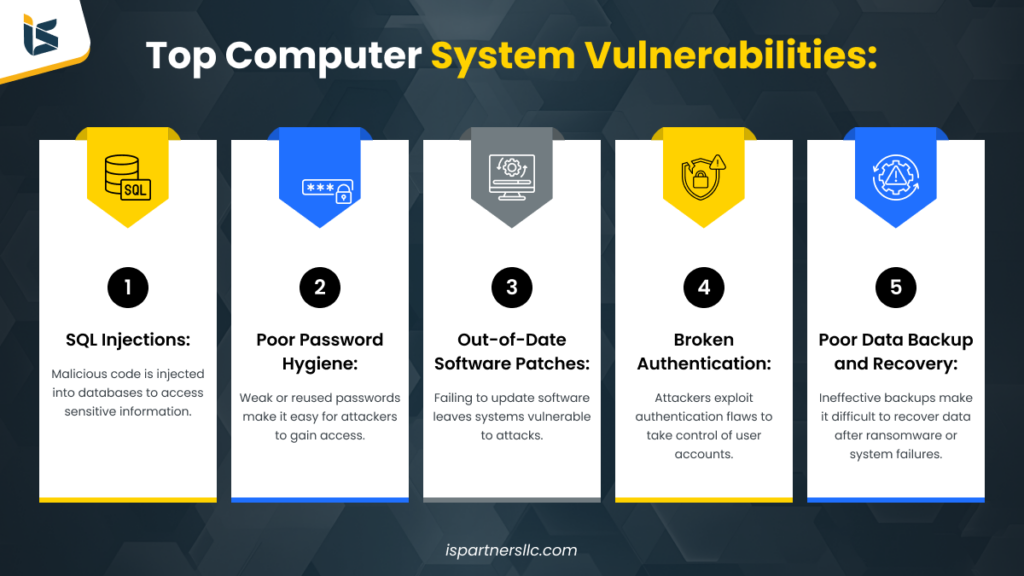
Now, building on this, here are the top 5 computer system vulnerabilities you need to know:
SQL Injections (SQLi)
SQL injection, or SQLi, is a common type of attack where malicious SQL code is used to manipulate a database. This allows attackers to access information that should remain hidden. Despite being known for over 20 years, SQLi still ranks as the top security vulnerability on OWASP’s Top 10 List.
When a SQL injection attack is successful, it can lead to unauthorized access to sensitive data, including:
- Passwords
- Credit card details
- Personal user information
SQL injection has been involved in many high-profile data breaches, resulting in reputational damage and regulatory fines for affected organizations. In some cases, attackers can create a backdoor into a system, allowing them to maintain access and compromise security over a long period without detection.
Poor Password Hygiene
Poor password hygiene refers to unsafe practices when creating, managing, and storing passwords. This can lead to unauthorized access and security breaches.:
Your organization could be exposed to major risk if employees are reusing the same password across several platforms. The aspects that can weaken passwords are:
- Weak Passwords. Using easily guessable passwords, like “123456” or “password,” makes accounts vulnerable to attacks.
- Reusing Passwords. Using the same password across multiple accounts increases risk. If one account is compromised, others become easy targets.
- Neglecting Updates. Failing to change passwords regularly or after a security incident can leave accounts exposed.
- Sharing Passwords – Sharing passwords with colleagues or friends can lead to unauthorized access and loss of control over accounts.
- Lack of Two-Factor Authentication (2FA). Not enabling 2FA means relying solely on passwords for security, which can be inadequate.
Out-of-Date Software Patches
Outdated software often lacks essential security updates, making it an easy target for cybercriminals. This not only puts your business’s confidential data at risk but also threatens your customers’ information.
When you and your staff do not immediately update new patch releases upon notification, it leaves an easy entry point for cybercriminals.
For instance, outdated systems are particularly attractive to hackers looking to carry out ransomware attacks. Research by Bitsight shows that organizations with poor patch management are at a much higher risk for ransomware incidents.
Specifically, those with a patching grade of D or F are over seven times more likely to experience a ransomware attack compared to those with an A grade.
Keeping your software up to date is crucial for protecting sensitive data and reducing the risk of cyber threats.
Broken Authentication
Broken authentication attacks aim to take over user accounts, allowing attackers to gain the same privileges as the targeted users. This happens when attackers can compromise passwords, session tokens, or other sensitive information.
These known vulnerabilities are increasingly common in web applications. Attackers may use brute-force methods to guess usernames and passwords, exploiting flaws in session management and authentication logic to gain control over accounts.
Key techniques attackers use include:
- Credential Stuffing. Attackers utilize lists of default usernames and passwords to gain access. To defend against this, users should change default credentials to unique ones.
- Unhashed Passwords. When passwords are stored as clear text instead of being scrambled (hashed), attackers can intercept them during transmission, leading to unauthorized access.
- Misconfigured Session Timeouts. If a user logs out but the attacker has their session cookie, the attacker can continue accessing the account, resulting in session hijacking.
Poor Data Backup and Recovery
With ransomware and other disasters always a security threat, organizations need reliable data backup and recovery solutions. However, many lack effective strategies for this.
All components involved in backups—like tape drives, disk arrays, backup servers, and networks—can fail. For those using cloud backups, having a strong and fast internet connection is essential for successful backups.
A major issue with backup failures is that they often go unnoticed until a restoration is needed. Because these failures don’t affect the production environment, they might not trigger any alerts. Unfortunately, it’s typically only when an operator tries to restore data that they discover a previous backup has failed, leaving them unable to recover essential files.
Cybersecurity Checklist To Mitigate Security Vulnerabilities
You don’t have to fall prey to hackers’ plans, plots, and schemes as long as you have a plan in place.
Our team of IT security consultants has developed a tested and proven cybersecurity checklist. Our team features a Certified Information Systems Security Professional (CISSP) and a Certified Information Security Manager (CISM). Together, they have created a handy and highly proactive checklist.
This list will have potential impacts and may be just the inspiration you need to help you kick off the season with confidence.
1. Implement Inventory Data Access and Protections
Answering a few basic questions about your company’s data can help you properly develop the rest of your office’s IT security checklist. We recommend the following three questions based on ideas set forth by the Federal Communications Commission (FCC):
- What Kind of Data Does Your Business Handle? Most data has value to someone, but some sensitive data has a significant monetary value to hackers. Your basic business operations files are likely not the primary objective for cybercriminals, who are more interested in your customers’ sensitive data, such as social security numbers, home addresses, birth dates, driver’s license numbers, and banking information.
- How Do You Handle and Protect Your Data? Basically, what are you doing right now to protect all data under your care, whether at rest or while on the move? Data that is on the move and active is any data that is in use for transactions, analysis, and marketing purposes. Each time your data is accessed, it becomes exposed to unique risks.
- Who Has Access to Your Data and Why? Not everyone has, nor should they have, access to all company data. Restricting access to data makes it easier to monitor any usage of that information to keep it safe and prevent any unnecessary movement that exposes it to dangers. Assign access to employees upon hiring, depending on their department and any other factors you determine so that you can manage and track their usage from the onset of their employment.
2. Update and Upgrade Everything
Cybercriminals work overtime to scour your system’s gateways, looking for the smallest technical vulnerability to sneak their way in. Unfortunately, older versions of hardware, software, and anything else are classic infiltration zones.
From your operating system to your software programs to your hardware, updates are critical to keeping your system healthy, according to the American Institute of Certified Public Accountants (AICPA). Following are some of the key updates and upgrades that we recommend.
Operating System Updates.
Whether you use Microsoft Windows or Apple OS, it is important that you set your system up for automatic updates.
Hardware
Take your payment terminals as one example: any time that a credit card is swiped for payment, the customer’s data becomes vulnerable; particularly if the merchant is still using outdated payment hardware and gateways. If you have outdated payment hardware, or any other outdated hardware, now is the time to upgrade.
Following are additional hardware pieces to inspect:
- Desktops
- Laptops
- Servers
- Mobile devices
- Point-of-Sale terminals
- Wi-Fi routers
With any necessary upgrades and updates in place, you can greatly reduce security flaws, thwarting hackers and shutting them down at the gateway to your workshop.
Software
If you are using older software versions, which no longer receive updates and are known as “end-of-life” software or devices like Windows XP, it is time to upgrade. No matter how great those programs were a decade ago, they are simply not safe for your operating environment now.
Cybercriminals often target outdated software because it’s easier to exploit. Using unsupported versions can lead to data breaches and other security incidents.
In addition to your desktop and laptop computers, remember your employees’ mobile device apps while attending to the software portion of your checklist. If your staff members regularly use smartphones or tablets for work tasks, make sure to update—or ask them to update—their devices for the latest system upgrades and minor updates to help prevent any type of infiltration.
Antivirus Systems
This one is crucial to keeping your system safe, of course. Make sure your anti-malware programs are set up to frequently check for updates and scan the device, or devices, on a set schedule. In larger firms, you may update your antivirus through a centralized server. Even better, when you work with a cloud service provider, they continually monitor and manage antivirus updates.
Browsers
Old and outdated browsers often contain security holes. New browser versions are easy to find, download, and install, and they are much faster and more secure.
Wireless Router & Network Devices
Go over all wireless networks and access points to ensure no rogue devices are camped out. Implement password policies to avoid weak passwords or tighten up existing policies to ensure strict compliance during the busy season.
3. Conduct a Thorough IT Audit
Password management is one of the toughest areas for IT to wrap up. In the meantime, one promising strategy includes using a “password manager” tool that your employees can load onto their desktops.
A few password vulnerability management options include LastPass and Dashlane. These tools remind employees to periodically update passwords. They also require them to create a strong password, according to your company’s standards.
If you’re looking for expert assistance, IS Partners, a CPA firm. We specialize in IT compliance and cyber risk advisory solutions, including SOC, PCI DSS, and HITRUST examinations. We offer a streamlined audit solution model that can help enhance your overall security posture.
4. Identify Redundant Software
Send out a reminder to staff to identify any programs that they are no longer using and uninstall them. This will help their hardware run more efficiently and eliminate any potential security vulnerabilities that are associated with these outdated programs.
5. Update IT Policies
Compliance regulations are updated often to help protect data in an ever-changing threat environment, and standards have become more stringent. That’s why now is a good time to review regulations and get informed about upcoming cybersecurity compliance changes.
Then, you can remind employees of their ongoing responsibility to help keep the computing network safe. Give employees new copies of the policy manuals when updated, and provide any necessary training to help reinforce policies.
6. Conduct Cyber Security Awareness Training for Your Employees
No matter how experienced your employees are, it never hurts to add in a training workshop to raise awareness. If you don’t already have one, develop a security incident response plan that details the security measures for understanding when, where, and how data has been compromised, as well as what subsequent steps should be taken.
Distribute this incident response plan manual to personnel on how to document events leading up to a breach, notification of appropriate staff, and the internal and external communications strategy.
7. Call in IT Security Experts
Call in reinforcements to perform a full-scale threat assessment on your system to identify any gaps that haven’t been addressed yet. Hiring outside security techs brings in a fresh set of eyes to check firewalls and encryption settings, and run a full antivirus scan to make sure all security software is up-to-date.
8. Perform a Pen Test
The main objective of penetration testing is to spot any security weaknesses. A pen test can also be used to test an organization’s security policy compliance, employee security awareness, and organization’s ability to identify and respond to security incidents.
Pen testing can be a great step at the end of the year. This way, you will be ready to clearly lay out the plan for addressing potential vulnerabilities in the new year.
9. Partner With An Audit Firm
Bringing an audit firm into your cybersecurity strategy is a smart move to enhance your security. These firms really know how to spot new vulnerabilities and bring valuable experience to the table, helping you uncover issues you might not notice on your own.
At IS Partners, we work with intention, insight, and initiative. What sets us, IS Partners, apart is our unique approach to cybersecurity. We use a combined control model that focuses on practical, cost-effective solutions that work in the real world.
We’re all about creating innovative solutions for today’s complex business and technical challenges. Let us help you strengthen your cybersecurity!
10. Audit Disabled Accounts
Keep track of disabled accounts, whether they’re for email, marketing tools, or development programs. These accounts can pose security risks because, if left unchecked, malicious actors might access them along with all the permissions they had.
For example, if an employee leaves the company or switches roles, their account might be disabled but not deleted.
This means someone could potentially exploit that account. To mitigate cybersecurity risk, your IT system administrator should regularly audit these accounts and delete those that belong to former employees or those who no longer need access. Keeping your account list clean helps protect your organization from potential threats.
Tackle Security Vulnerabilities With IS Partners
Identifying vulnerabilities is critical for any organization aiming to protect its systems, data, and reputation. Cybersecurity threats continue to evolve, and even the smallest gap in security can lead to breaches with severe consequences. This makes it essential to stay ahead of vulnerabilities before they turn into major issues.
Auditors play a key role in helping organizations uncover these vulnerabilities. Through comprehensive audits, they assess current systems, uncover hidden weaknesses, and provide actionable insights to bolster security.
What Should You Do Next?
Here are three essential steps to get ahead of security vulnerabilities:
Implement proactive monitoring and scanning tools. Use automated tools like vulnerability scanners to continuously monitor your systems for potential weaknesses, including outdated software or misconfigurations.
Leverage IS Partners’ penetration testing and cybersecurity assessments. Proactively identify hidden risks and gaps in your security framework with expert penetration testing and thorough IT audits. IS Partners offers tailored solutions to help you secure your systems before threats emerge
Strengthen access controls and authentication. Ensure that proper access controls are in place, including multi-factor authentication and strong password policies, to prevent unauthorized access to critical data and systems.
Take control of your organization’s security. Contact IS Partners today to schedule a vulnerability audit or penetration test, and ensure your systems are protected from emerging threats.
FAQs